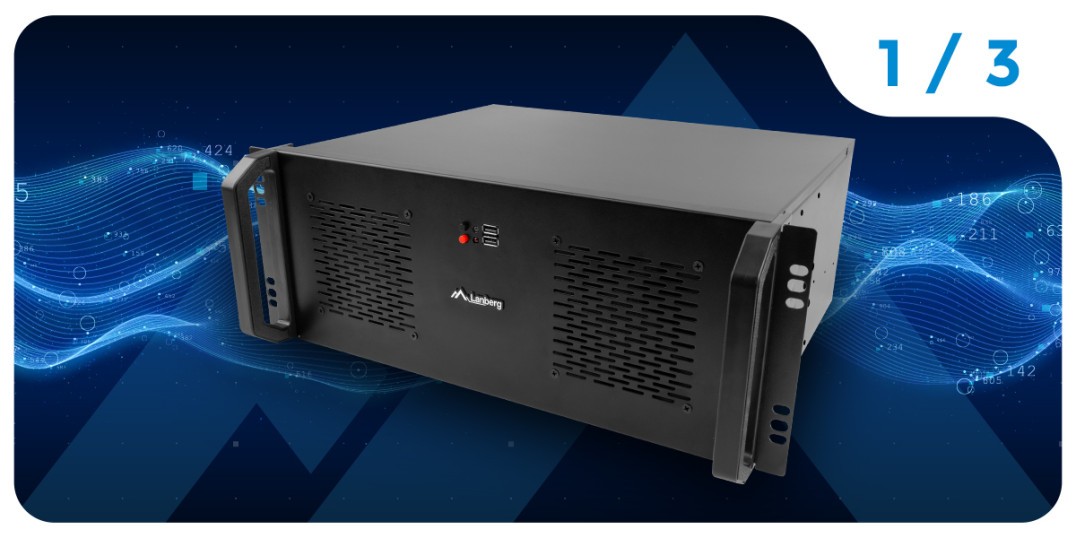
A network server computer - what are its characteristics and what does such a system require?
Servers are the foundation of modern IT solutions, used to support business applications, provide network services and store sensitive data. Unlike PCs, or even powerful workstations and gaming machines, a network server must operate continuously, often around the clock, and the risk of failure should be minimized to an absolute minimum. Key features include:
- Stability: Reliability in terms of continuous operation.
- Data security: Protection against loss and unauthorized access.
- Expandability and scalability: Flexibility for changing needs.
- Environmental control: Monitoring temperatures, power and other parameters.
All of this requires the right hardware configuration, especially in terms of processors, RAM, disk system and, importantly, a dedicated chassis that protects and supports these components.

High-performance processor or processors with spare computing power
In the case of servers, we can encounter both standard desktop processors (e.g. Intel Core, AMD Ryzen) and lines designed typically for server solutions, such as Intel Xeon or AMD EPYC server processors. The latter offer, among other things:
- Support for a large number of cores and threads.
- Extensive cache resources.
- Additional instructions to support virtualization and encryption.
- RAS (Reliability, Availability, Serviceability) features, important in data centers.
Professional server motherboards are able to support multiprocessor configurations, allowing the creation of platforms with enormous computing power. The choice of processor should depend on the nature of the tasks - database servers, mail servers or virtualization systems have different requirements.
Compatibility with a wide selection of supported motherboards
The dominant motherboards in servers are ATX, E-ATX, Micro-ATX, ITX or SSI CEB formats. These standards define, among other things, the dimensions, number of PCIe expansion slots or memory banks. The most important issues are:
- The ability to install multiple expansion cards - such as RAID controllers, 10GbE network cards or graphics cards (in HPC or AI contexts).
- Support for multiprocessing - typical of SSI CEB server motherboards.
- Number of DIMM slots - crucial for large amounts of RAM.
- Effective cooling - heat sinks on power sections and bridges for stable operation.
The size and standard of the motherboard has a direct bearing on the choice of chassis: not only do you need to accommodate the motherboard, but you also need to provide an adequate number of drive bays and space for an efficient cooling system.
Secure storage space for large amounts of data - drives in RAID configuration
An important aspect is the storage and security of data. This is where various RAID (Redundant Array of Independent Disks) configurations come to the rescue. Here's a brief overview of the most popular solutions:
- RAID 0: Combines disks for greater performance and capacity, but does not provide redundancy.
- RAID 1: Mirrors data across two (or more) disks for high security at the expense of performance and available capacity.
- RAID 5: Uses parity data separation, offering a good balance between performance and security.
- RAID 6: Double parity gives even greater security, allowing as many as two drives to fail simultaneously.
- RAID10: Combines the advantages of RAID 0 (performance) and RAID 1 (redundancy). However, it is a more demanding configuration in terms of the number of drives.
To take full advantage of RAID, the server chassis must provide a sufficient number of drive bays (both HDD and SSD). Hot-swap disk bays are often used, allowing "hot-swapping" of disks. In large data centers, for optimal operation of the entire system, advanced SSDs (platter and PCI-E) are usually used, which consume less power and offer the best read and write performance.
Stable power supply and dedicated UPS solutions
The power supply should be oversized (power with a reserve), have high efficiency (preferably 80 PLUS certifications), and equipment useful for servers:
- Modular cabling: Makes cable management easier and improves airflow.
- Surge protectors: Protect expensive components.
- Dust filters: Reduce the entry of dirt.
UPS (Uninterruptible Power Supply) play a key role in the field of emergency power. In professional environments, they are often used in conjunction with battery packs to increase backup time.
What is a server enclosure and why is it essential in data centers and IT infrastructure?
A server enclosure is not just a "box" for components - it is an essential part of IT infrastructure that:
- Protects components from mechanical damage and dust.
- Ensures proper airflow and the possibility of mounting additional fans.
- Allows for convenient expansion: free disk bays, space for additional expansion cards, easy access to components are essential.
Data centers and server rooms rely on standardization in the form of RACK enclosures (19" wide), allowing quick installation in server racks. Other network equipment (switches, routers, patchpanels, PDUs) are also mounted there.

How does a computer chassis affect the performance of server components: ram memory, processor and disks?
The enclosure must provide:
- Space for adequate radiator cooling for processors, RAM chips and power sections.
- Sufficient number of slots and bays for expansion cards, HDDs and SSDs.
- Optimal air circulation - crucial in preventing components from overheating, especially in heavily loaded servers.
An inadequately ventilated chassis results not only in an increased risk of failure, but also in the phenomenon of thermal throttling, which drastically reduces performance.
The need for advanced cooling for the proper operation of server components
Thermal th rottling (overheating of CPU/GPU chips resulting in reduced clocking) is a particularly undesirable phenomenon in server environments. To prevent it:
- The ventilation system in the chassis must be efficient and well thought out.
- Built-in fans should create a tunnel of airflow through the chassis.
- Mounting options for additional fans increase flexibility for server expansion.
- Regular service and maintenance (e.g., cleaning filters, replacing worn-out fans) extend the life.
Lanberg's server enclosures address these requirements with factory-installed fans that efficiently cool key components. Depending on the model, they also allow the installation of additional fans - both Lanberg brand and other manufacturers.
RACK and TOWER server enclosures - which to choose for which applications?
TOWER server enclosure - best for small and medium-sized businesses
TOWER enclosures resemble classic PC enclosures. For small server installations, such as in a small office, home or workshop, they have several advantages:
- Ease of installation: Does not require a RACK cabinet, which reduces costs.
- Mobility: They can be moved as needed.
- Sufficient space for cooling: Freestanding design facilitates heat dissipation.

RACK models - ideal for larger companies, industry and data centers
RACK (e.g., 19") enclosures are designed to be mounted in server racks, allowing you to:
- Centralization: Concentrating the entire infrastructure (servers, switches, patchpanels, UPS) in one place.
- Easy maintenance: Hardware is standardized, easily accessible from the front and back of the rack.
- Space savings: In environments where vertical (U) space is important, space can be efficiently utilized with RACK.
How to choose enclosure height: advantages of 1U, 2U, 3U, 4U models
RACK enclosure height is measured in U units (1U = 1.75 inches ≈ 4.45 cm). Small servers for less demanding tasks usually fit in 1U or 2U enclosures. In contrast, 3U and 4U offer space for more advanced configurations:
- Support for higher heatsinks and CPU cooling.
- The ability to mount full-size graphics cards, useful for AI, machine learning and HPC computing.
- More disk bays for storage expansion.
Lanberg focuses primarily on 3U and 4U enclosures, designed for demanding applications where performance and reliability are a priority.
Easy management and expansion convenience - what to look out for?
In the context of server management, the following are important:
- Front I/O panel with USB ports, indicator lights and buttons.
- Access to the interior (such as side panels in Lanberg RACK cabinets or optional rear access).
- Robust design - sheet metal thickness, edge finishing, cable routing system.
- Quick expandability - free expansion slots, additional space for hard drives, etc.
Lanberg offers both hanging RACK cabinets, allowing easy access from the rear (two-section cabinets), and standing cabinets, dedicated to advanced server rooms. Thanks to the ability to remove the side panels, the installation and service of the server enclosure are greatly simplified.
Summary of part 1 of the guide
The choice of a server enclosure, whether TOWER or RACK, is one of the key elements in designing a stable and efficient IT infrastructure. The right design protects server components, provides the necessary cooling, and facilitates future expansion - so when buying, it is worth looking at all features in terms of the intended functions of the server.
Recommended Lanberg server RACK enclosures
At the moment, Lanberg offers the following 4U enclosures:
They will soon be joined by new, even more advanced 2U and 4U variants: SC01-5202-12, SC01-6502-12B and SC01-5204-12B, which will provide even more expansion possibilities and effective cooling. Choosing Lanberg products is a guarantee of solid quality, advanced design and the ability to create reliable, scalable server configurations.